YiloKit stampa.
Yilo helps you learn languages from your input in AI tools on Mac. It offers natural rewrites or translations, with notes and examples when useful. Study several languages at once.
- Piattaforma
- Mac · iPhone
- Disponibilità
- Mac download · iPhone TestFlight beta
- Link ufficiali
English
Yilo
Yilo helps you learn languages from your input in AI tools on Mac. It offers natural rewrites or translations, with notes and examples when useful. Study several languages at once.
Formerly YiYan.
Yilo saves your useful new input from supported AI tools as learning records. Your original request goes through as usual.
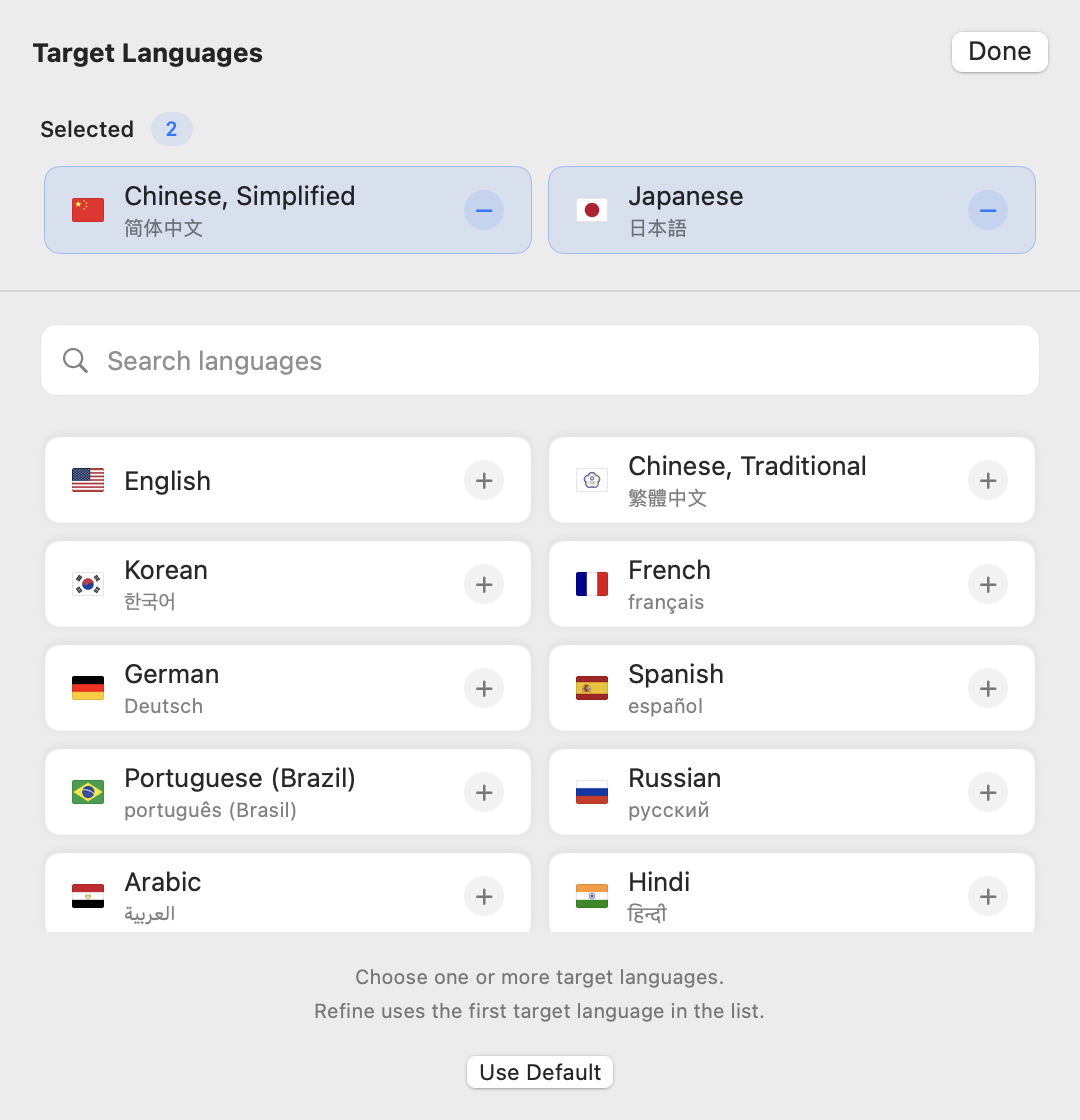
Choose the languages you want to learn. Each language gets a natural rewrite or translation.
Each learning language can have up to three notes. You can ask follow-up questions about a record on Mac.
Enter text directly or refine text in another app. Refinement uses the first language on your learning list.
Find records by date, bookmark them and copy expressions. You can retry failed records or delete records.
Enable iCloud to read, listen to and review records on iPhone. Daily reminders are available. The iPhone app uses TestFlight.
Use Pi, Claude Code, Codex, OpenCode or Antigravity. Capture new input while Yilo runs, with no extra model or API setup.
Supports Pi, Claude Code, Codex, OpenCode and Antigravity. Captures new input only while running. It does not import old conversations.
The related AI tool must be installed, signed in and available. No extra model or API setup is needed.
Use the same Apple Account on Mac and iPhone. Enable iCloud to search, bookmark and browse synced records on iPhone, including offline.
Records stay on your Mac by default; iCloud sync is optional. Rewrites, translations, notes and follow-up questions use the related AI service.
Records stay on your Mac by default. You choose whether to enable iCloud. Translations, notes and follow-up questions use the related AI service.
Yilo filters low-value input and hides secrets it can identify with high confidence. Code, paths and URLs stay unchanged.
Mac follow-up chat history stays on your Mac. It is not synced or exported. You can delete cloud records and keep the Mac copies.
Type directly or refine text in other apps. Refinement uses your first learning language and needs Accessibility permission.
In other apps, refinement replaces selected text. Without a selection, it adds the result after the original. This requires Accessibility permission and supports Services.
Adjust shortcuts, pinning, opacity, themes and text size. Launch at login and automatic updates are available.
The read-only CLI exports records. On iPhone, copy record context or open ChatGPT, Claude or Gemini. You decide when to send it.
Study several languages at once. Use Pinyin, Zhuyin, Hiragana or Romaji to help you read.
The source language starts with your system language. The first learning language is English, or Simplified Chinese for an English source. Change these settings at setup or later. There is no target-language limit.
Choose the explanation language, writing style and tone. English learners can choose US or UK English.
Chinese translations can show Pinyin or Zhuyin. Simplified Chinese defaults to Pinyin; Traditional Chinese defaults to Zhuyin. Pinyin appears above words; Zhuyin appears beside characters. You can turn readings off in settings.
Japanese translations can show Hiragana or Romaji readings. This is off by default. Hiragana appears above kanji; Romaji appears above word groups. Readings do not change copied text, notes or refinement results.
README.md
Yilo — Press Kit
- Website: https://lazyapps.com/en/yilo/
- Press Kit: https://lazyapps.com/en/yilo/presskit/
- Platform: Mac · iPhone
- Availability: Mac download · iPhone TestFlight beta
- Media contact: [email protected]
About the app
Yilo helps you learn languages from your input in AI tools on Mac. It offers natural rewrites or translations, with notes and examples when useful. Study several languages at once.
Formerly YiYan.
Yilo saves your useful new input from supported AI tools as learning records. Your original request goes through as usual.
Choose the languages you want to learn. Each language gets a natural rewrite or translation.
Each learning language can have up to three notes. You can ask follow-up questions about a record on Mac.
Enter text directly or refine text in another app. Refinement uses the first language on your learning list.
Find records by date, bookmark them and copy expressions. You can retry failed records or delete records.
Enable iCloud to read, listen to and review records on iPhone. Daily reminders are available. The iPhone app uses TestFlight.
Use Pi, Claude Code, Codex, OpenCode or Antigravity. Capture new input while Yilo runs, with no extra model or API setup.
Supports Pi, Claude Code, Codex, OpenCode and Antigravity. Captures new input only while running. It does not import old conversations.
The related AI tool must be installed, signed in and available. No extra model or API setup is needed.
Use the same Apple Account on Mac and iPhone. Enable iCloud to search, bookmark and browse synced records on iPhone, including offline.
Records stay on your Mac by default; iCloud sync is optional. Rewrites, translations, notes and follow-up questions use the related AI service.
Records stay on your Mac by default. You choose whether to enable iCloud. Translations, notes and follow-up questions use the related AI service.
Yilo filters low-value input and hides secrets it can identify with high confidence. Code, paths and URLs stay unchanged.
Mac follow-up chat history stays on your Mac. It is not synced or exported. You can delete cloud records and keep the Mac copies.
Type directly or refine text in other apps. Refinement uses your first learning language and needs Accessibility permission.
In other apps, refinement replaces selected text. Without a selection, it adds the result after the original. This requires Accessibility permission and supports Services.
Adjust shortcuts, pinning, opacity, themes and text size. Launch at login and automatic updates are available.
The read-only CLI exports records. On iPhone, copy record context or open ChatGPT, Claude or Gemini. You decide when to send it.
Study several languages at once. Use Pinyin, Zhuyin, Hiragana or Romaji to help you read.
The source language starts with your system language. The first learning language is English, or Simplified Chinese for an English source. Change these settings at setup or later. There is no target-language limit.
Choose the explanation language, writing style and tone. English learners can choose US or UK English.
Chinese translations can show Pinyin or Zhuyin. Simplified Chinese defaults to Pinyin; Traditional Chinese defaults to Zhuyin. Pinyin appears above words; Zhuyin appears beside characters. You can turn readings off in settings.
Japanese translations can show Hiragana or Romaji readings. This is off by default. Hiragana appears above kanji; Romaji appears above word groups. Readings do not change copied text, notes or refinement results.
Language-learning animation · MP4
Kevin MacLeod · Fluffing a Duck · CC BY 4.0
Official links
Images
App icon
1024 × 1024 · PNG
Original native App icon, 1024 × 1024 PNG. Preserves the app’s artwork, proportions and transparency.
Learning record · Pinyin and Romaji
1488 × 1033 · PNG
English input, Simplified Chinese with Pinyin, Japanese with Romaji, and English learning notes.
Learning language settings
1240 × 880 · PNG
English source with Simplified Chinese and Japanese selected for learning. Sample settings.
Choose learning languages
1080 × 1120 · PNG
Simplified Chinese and Japanese selected. Sample settings.
Flat vector artwork
1024.0 × 1024.0 · SVG
Flat SVG assembled from the original vector artwork and layer positions. Native glass, lighting and platform icon masks are not reproduced; use the PNG for the complete native app icon.
Social sharing image
1200 × 630 · PNG
Existing 1200 × 630 promotional artwork, not an app screenshot.
Short input example
1040 × 661 · PNG
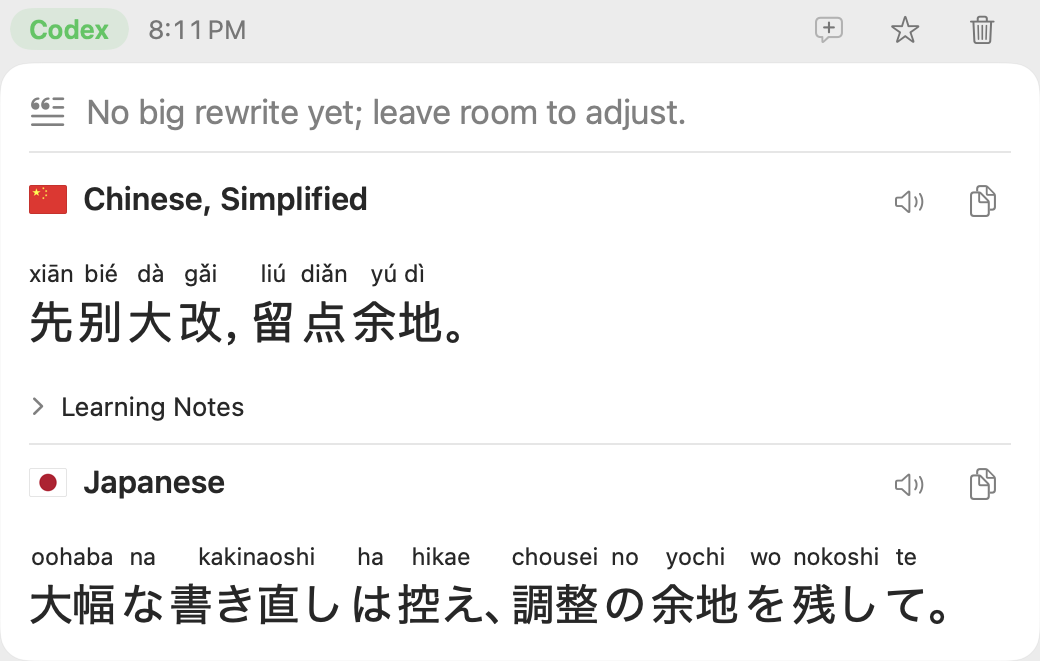
Native learning card: English input, Simplified Chinese with Pinyin and Japanese with Romaji. Largest text size. Sample content.
Language-learning animation
1280 × 608 · JPEG
Pelican line-art animation with a native learning record. Learn natural phrasing from short AI-agent input. Speak more naturally with other people.
Using these materials
For editorial coverage of this product. Preserve names, proportions and context; credit lazyapps and link to the product website. Third-party content and trademarks retain their respective rights; this kit grants no standalone reuse rights. Contact us for other uses.
App icon
1024 × 1024 · icon.png
Original native App icon, 1024 × 1024 PNG. Preserves the app’s artwork, proportions and transparency.
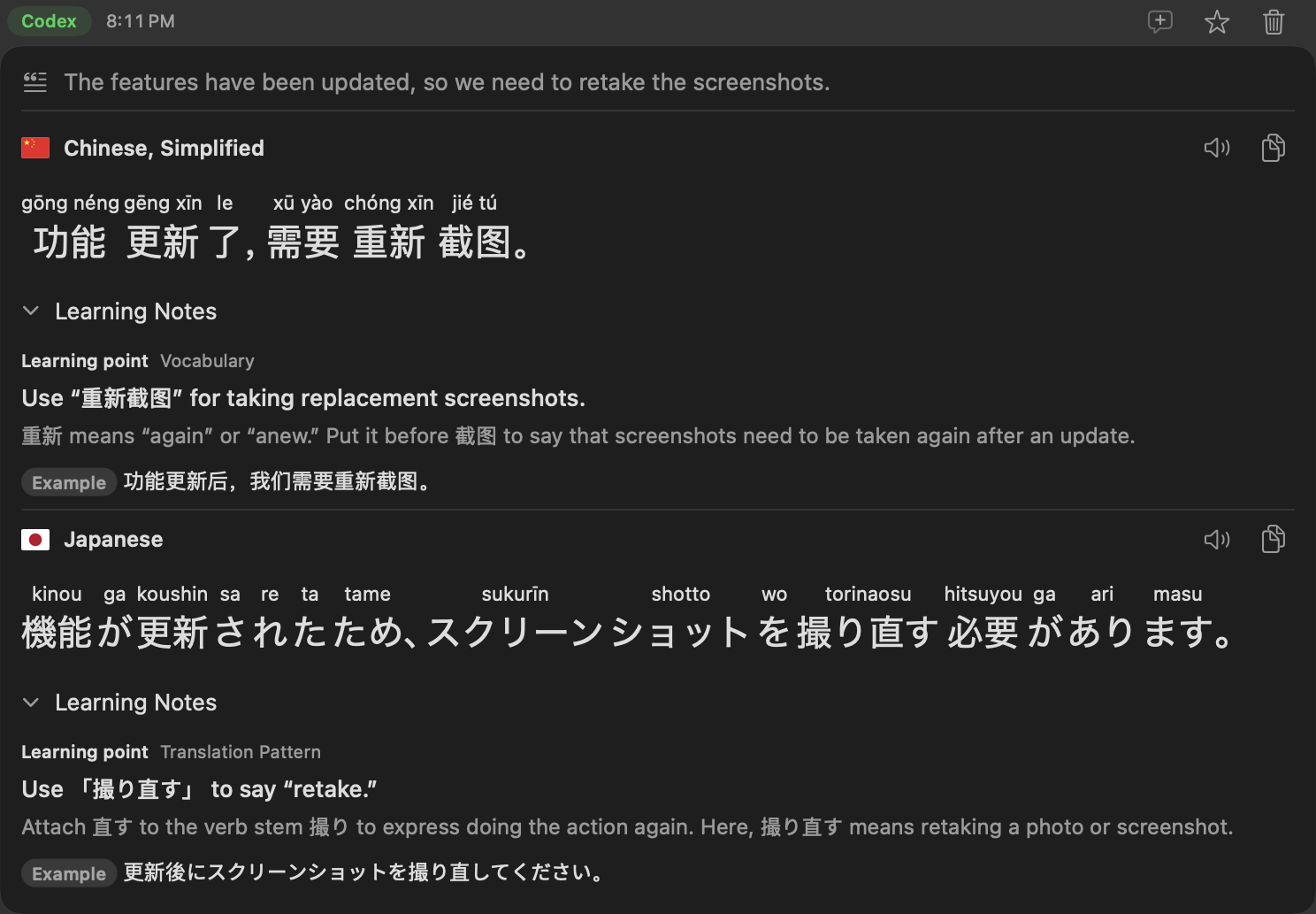
Learning record · Pinyin and Romaji
1488 × 1033 · en/learning-record.png
English input, Simplified Chinese with Pinyin, Japanese with Romaji, and English learning notes.
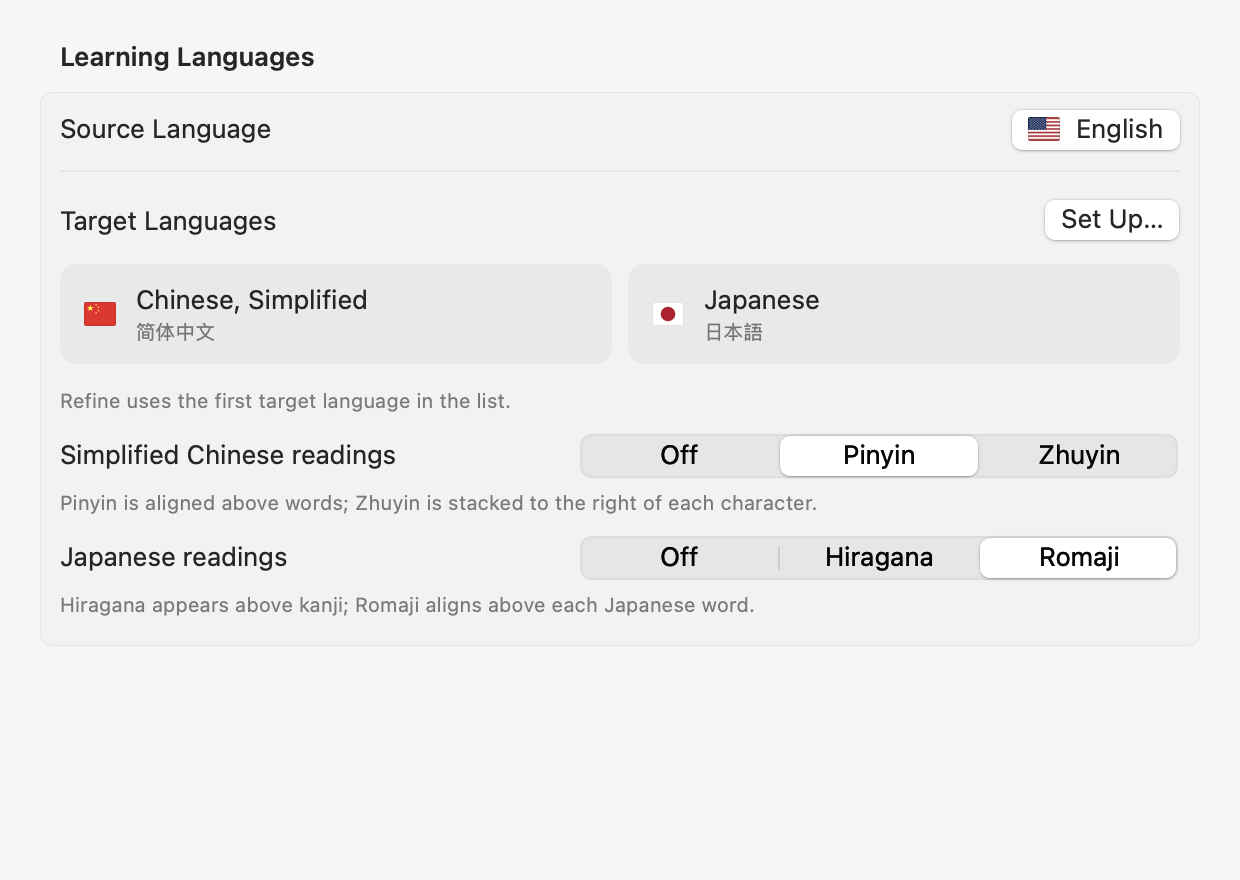
Learning language settings
1240 × 880 · en/learning-settings.png
English source with Simplified Chinese and Japanese selected for learning. Sample settings.
Choose learning languages
1080 × 1120 · en/language-selection.png
Simplified Chinese and Japanese selected. Sample settings.
Flat vector artwork
1024 × 1024 · artwork-flat.svg
Flat SVG assembled from the original vector artwork and layer positions. Native glass, lighting and platform icon masks are not reproduced; use the PNG for the complete native app icon.
Social sharing image
1200 × 630 · social-card.png
Existing 1200 × 630 promotional artwork, not an app screenshot.
Short input example
1040 × 661 · en/hero-record.png
Native learning card: English input, Simplified Chinese with Pinyin and Japanese with Romaji. Largest text size. Sample content.
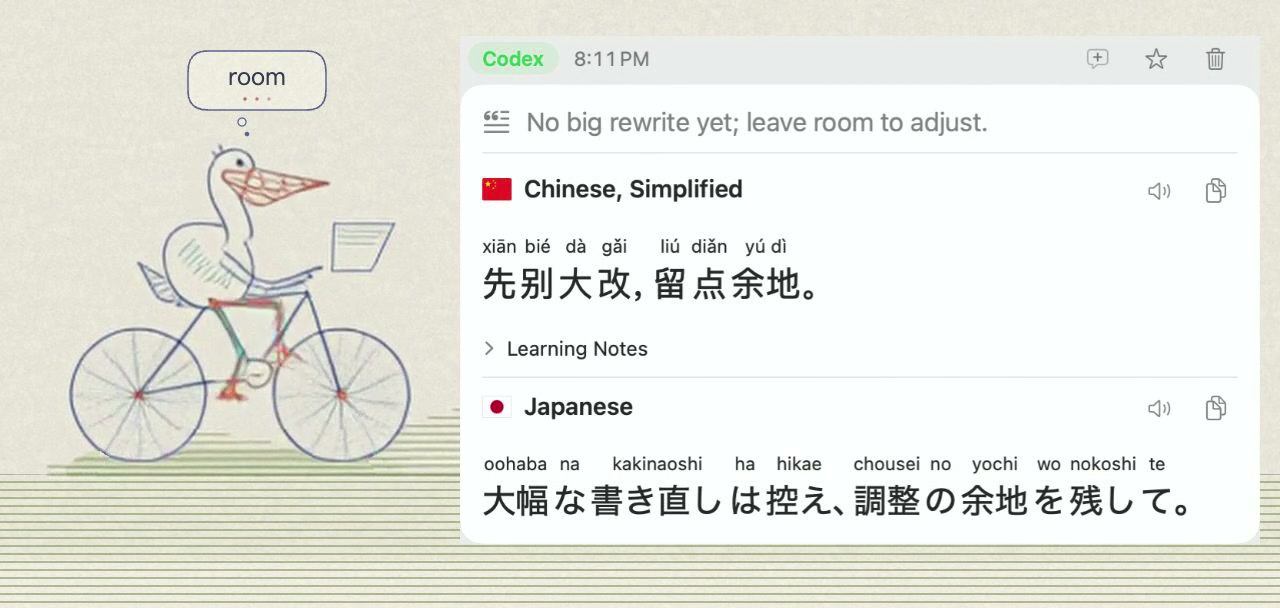
Language-learning animation
1280 × 608 · en/hero-animation.jpg
Pelican line-art animation with a native learning record. Learn natural phrasing from short AI-agent input. Speak more naturally with other people.